
eFerret - Alerts for eBay
Ferretech LLCShopping
4.257.00 Reviews
- Version
- 2.9.10
- Installs
- 10.00K
- Age Rating
- Everyone
Screenshots


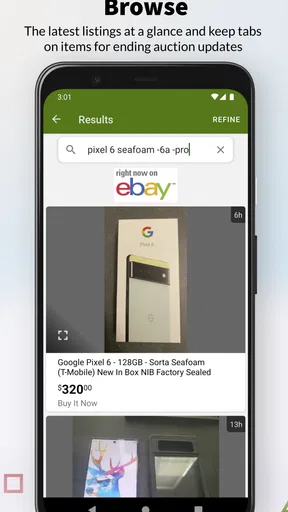

Our Review of eFerret - Alerts for eBay
 Analysis by Appyee
When I’m looking for a specific item on eBay, I don’t want to keep reopening searches just in case something suitable has appeared. That’s the problem eFerret - Alerts for eBay is meant to solve: it turns a search into something I can monitor, so I can spend less time checking listings manually and more time deciding whether a find is actually worth pursuing. It is a focused shopping app from Ferretech LLC, rather than a general marketplace or an all-purpose resale toolkit.
What the free access means in practice
eFerret is free to download, which makes it easy to try without paying just to see whether saved searches fit your routine. The app also offers in-app purchases, with listed items ranging from $4.99 to $39.99 each. I’d treat those as optional paid value rather than assume that every useful part of the service requires an upgrade: the key question is whether its alert workflow saves you enough effort to justify any purchase you choose to make.
That distinction matters if you are only an occasional eBay buyer. You can start by testing a narrow search and see whether the notifications are useful before spending anything. If you are considering a paid item, check what it unlocks in the app at the time you use it and compare that benefit with how often you actually search. A price range alone doesn’t tell me which purchase is right for every user, so I would decide based on a real need rather than buying on impulse.
Setting Up Your Shopping Companion
The first thing you’ll notice about eFerret - Alerts for eBay is how easy it is to get started. After downloading the app, which is available for both Android and iOS, you’re greeted with a simple and intuitive interface. Setting up alerts is a breeze. You just enter the keywords for the items you’re interested in, and eFerret takes it from there. It’s like having a personal shopper who never sleeps.
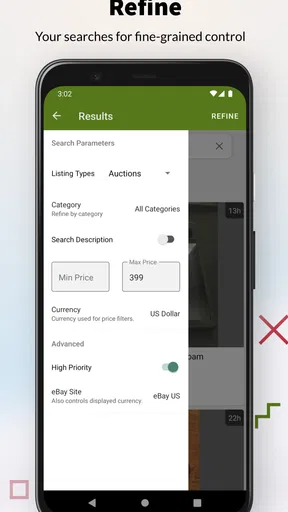
One of the standout features is the ability to customize your alerts. You can specify price ranges, choose auction or buy-it-now listings, and even set the frequency of notifications. It’s all about making the app work for you, rather than you working for it. And trust me, once you’ve set it up, you’ll wonder how you ever managed without it.
The Magic of Real-Time Notifications
Now, here’s where things get exciting. Imagine getting a notification the moment a rare vinyl record or a vintage handbag hits eBay. That’s the real magic of eFerret. The app sends you real-time alerts, ensuring you’re always in the know. I’ve managed to snag a few treasures thanks to this feature, and it’s a game changer.
Moreover, the notifications are smart. They’re not just a flood of random alerts but are tailored to your preferences. This means you’re only nudged when something truly worth your attention pops up. It’s efficient and effective, keeping your eBay experience focused and fruitful.
Turning a search into a useful routine
The biggest practical benefit is not simply speed; it is being able to separate a deliberate search from the rest of your day. I’d set up one alert for an item I genuinely want, then check a notification when I have a moment rather than repeatedly opening eBay. That works especially well for things with several common names or model variations, where I can make separate, specific searches instead of relying on one vague phrase.
For example, if I were watching for a particular camera model, I would use the exact model wording and a sensible price ceiling, then create another search for a spelling or naming variation if sellers commonly describe it differently. I would keep those searches distinct at first. That makes it easier to tell which wording is bringing useful matches and which is mostly noise, and I can tighten or remove the less helpful alert instead of letting a broad search become annoying.
There is a useful trade-off here: a very narrow search can miss a listing whose seller uses unusual wording, while a broad one can draw attention to near-matches. I would start precise, then widen only when I see a reason. Price limits and the choice between auction and buy-it-now listings can also help focus a search, but they cannot decide whether an item is authentic, complete, or worth its condition-dependent price. Those checks still belong to me.
A User-Friendly Journey
From a usability standpoint, eFerret scores high marks. The design is clean and straightforward, ensuring that even the least tech-savvy among us can navigate it with ease. The app doesn’t try to do too much; it sticks to its core function of providing alerts, and does it exceptionally well.
Another feature I appreciate is the ability to manage multiple eBay accounts. If you’re someone who buys and sells on different accounts, eFerret has got you covered. You can toggle between accounts without any hassle, making the app versatile and user-friendly.
Using alerts without letting them take over
I would treat an alert as a prompt to investigate, not as a recommendation to buy. A quick notification can be handy when a listing is time-sensitive, but it does not replace reading the description, looking closely at photos, checking seller details, or comparing the total cost. Shipping and the item’s condition can change the apparent bargain, so I would open the listing and assess it before acting, even when the headline price fits my target.
For a reseller, that extra pause is especially important. A low asking price is not the same as a profitable purchase: resale value, fees, shipping, repair needs, and how long an item might take to sell all affect the calculation. eFerret can help surface candidates, but I would keep a simple note of my maximum purchase price and the reasons an item qualifies before bidding or buying. That small habit can prevent a fast alert from turning into a rushed decision.
It can also help to be selective about notification frequency. Someone tracking a collectible with a small number of plausible listings may welcome quick updates. Someone searching a broad category may find frequent prompts distracting and may prefer a less immediate cadence. The right setup depends on how quickly you can act and how much attention you want the search to demand; being notified sooner is only valuable if you can review the result calmly.
When another approach is better
Compared with checking eBay manually, an alert-focused app is more convenient for searches you want to revisit over time. It is less useful when you are casually browsing without a clear target, because ordinary marketplace browsing is better for discovering items you did not know to search for. eFerret’s strength is watching for terms and preferences you choose, not replacing the whole process of exploring eBay or judging an individual listing.
It also serves a different purpose from a spreadsheet or a dedicated resale calculator. Those tools can help organize costs and estimate margins, while eFerret is aimed at finding listings to inspect. If your main challenge is deciding what to pay, tracking inventory, or planning a resale business, an alert app alone will not solve it. I’d pair it with whatever method I already use to compare costs, rather than expect notifications to make the buying decision for me.
And if I only need to find something once, a normal eBay search may be simpler than creating an ongoing alert. The extra setup earns its keep when timing matters or when the item is uncommon enough that checking repeatedly would be tedious. That is the clearest dividing line: repeated monitoring is where this app makes sense; a quick one-off search is where the marketplace itself may be enough.
Who is likely to get value from it?
I can see eFerret working best for collectors with a defined wish list, bargain hunters who know their spending limit, and resellers who want to spot possible stock without constantly refreshing searches. It is also a reasonable fit for someone who already uses more than one eBay account, since managing those accounts is part of the app’s appeal. The common thread is a specific target and a willingness to review listings carefully when a match appears.
It is less compelling for people who shop on eBay only once in a while, prefer wandering through categories, or do not want another source of notifications. It may also disappoint anyone expecting an alert to guarantee a genuine bargain or an item’s quality. A match means the listing fits a search, not that it has passed a human check. If you would rather inspect every result yourself at your own pace, manual searching may feel more controlled.
A realistic routine might be checking eFerret during a lunch break after an alert arrives for a collectible I have been waiting to find. I would compare the listing with my saved budget, inspect its condition and seller information, and then decide whether to open eBay and act. If it is not suitable, I can move on without having spent the morning repeatedly searching. That is a modest convenience, but for a hard-to-find item it can make the hunt feel much less consuming.
Why eFerret Stands Out
So, what makes eFerret a must-have for any eBay enthusiast? First off, the real-time alerts are a game changer. They put you ahead of the competition, giving you the first pick of the best deals. Secondly, the customization options allow you to tailor your experience exactly how you want it. Whether you’re a casual shopper or a dedicated eBayer, eFerret adapts to your needs.
Additionally, the app’s performance is solid. I didn’t encounter any bugs or crashes during my time using it, and the notifications arrived promptly every time. It’s reliable, which is crucial when you’re hunting for deals that might disappear in a flash.
Compatibility and day-to-day expectations
eFerret is rated for Everyone, and its current version is 2.9.10. On Android, the minimum operating system is 6.0. Those details make it easier to judge whether it suits a particular device, while the 4.2 average from 186 ratings gives a broad indication of how other users have responded. It has passed 10K installs and includes 57 written reviews, but I would read individual comments with the same care I use for marketplace listings: overall figures are context, not a promise that the experience will be identical on every phone.
The app was released on December 8, 2017, so it has been around long enough to have a substantial user history, while the version number identifies the current build rather than guaranteeing that every feature behaves perfectly on every device. If timely alerts are central to your plan, I would test a search for an item I can afford to miss before depending on it for a rare, high-stakes purchase. That is a sensible way to learn whether the alert rhythm suits my habits without making the app responsible for a decision I should verify myself.
One question people often have is whether an alert means they can complete a purchase inside the app. I would think of eFerret primarily as a way to monitor searches and bring listings to my attention; the actual decision still involves examining the eBay listing and completing the shopping steps there as appropriate. Another practical question is whether alerts eliminate the need to use filters on eBay. They do not eliminate careful checking: search preferences narrow what comes to you, while the listing itself supplies the details needed to judge the item.
For Android users, the stated minimum system requirement is useful before installing, but a compatible operating system does not by itself tell me how notifications will behave with every device setting. I would allow the app’s alerts if I want to benefit from them and review my searches after the first few notifications. If results are too broad, I would refine the keywords or price range; if they are too quiet, I would reconsider whether my search wording is too restrictive. This is a practical adjustment loop, not a promise that every search can be made perfect.
In a Nutshell
In conclusion, eFerret - Alerts for eBay is a fantastic tool for anyone who spends time on eBay. It simplifies the shopping experience, making it smarter and more efficient. With its user-friendly interface, customizable alerts, and reliable performance, it’s hard not to recommend it. Whether you're looking for vintage finds or the latest tech gadgets, eFerret will help you get there.
So, if you’re tired of missing out on great deals or just want to streamline your eBay experience, give eFerret a try. It’s like having a savvy shopping buddy right in your pocket. Happy hunting!
My buy-or-skip verdict
I would try eFerret if I had a recurring eBay search, a firm idea of what I wanted, and enough patience to inspect each result rather than buy on notification alone. Its free access makes that trial straightforward, while the in-app purchase range means I would check the specific paid benefit before spending. The value is strongest when finding a timely listing saves me repeated manual searches; it is weaker when I browse only occasionally or want a tool that handles valuation and resale planning too.
Verdict
Strengths of eFerret - Alerts for eBay
- Real-time notifications for auctions.
- Customizable alert settings.
- User-friendly interface.
- Tracks price changes efficiently.
- Supports multiple eBay accounts.
Limitations of eFerret - Alerts for eBay
- Requires internet connection.
- Limited to eBay platform only.
- Occasional sync delays.
- In-app purchases for premium features.
- No offline alert functionality.
Similar Picks in This Category
View All
SHEIN-Shopping Online
Roadget Business PTE. LTD.4.8

Amazon Shopping
Amazon Mobile LLC4.4


Mercado Libre: Compras online
Mercado Libre4.8

Wish: Shop and Save
Wish US Holdings LLC4.7

Alibaba.com - B2B marketplace
Alibaba Mobile4.4
Frequently Asked Questions
What is eFerret - Alerts for eBay?
eFerret is a mobile application designed to help users find the best deals on eBay by setting up customized alerts. It scans listings based on your criteria and notifies you when items matching your interests become available. This way, you can stay ahead of the competition and snag deals quickly.
How do I set up alerts on eFerret?
Setting up alerts on eFerret is simple. After downloading the app, you can enter specific keywords, price ranges, and categories that match your interests. Once configured, eFerret continuously monitors eBay for listings that fit your criteria, sending you notifications when new items are posted.
Is eFerret free to use?
eFerret offers a free version with basic features. However, for advanced options like unlimited alerts and enhanced search filters, there’s a premium version available through in-app purchases. This allows users to customize their experience further and access more comprehensive search capabilities.
Can eFerret track multiple eBay accounts?
Currently, eFerret is designed to work with a single eBay account at a time. Users can switch accounts by logging out and signing in with a different eBay ID. This feature ensures that alerts are tailored to your specific account preferences and needs.
Is my data safe with eFerret?
eFerret takes user privacy and data security seriously. The app uses secure connections to interact with eBay and does not store sensitive information like passwords. User data is handled in compliance with privacy standards to ensure your information remains safe and confidential.
